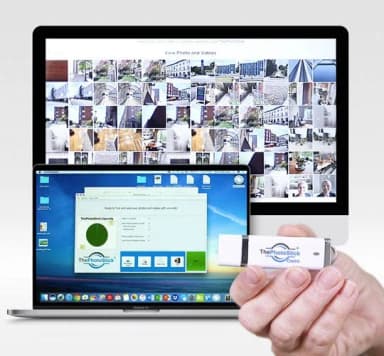
Plug in. Every photo saved.
PRODUCT REVIEW · Tech & charging
ThePhotoStick Review (2026): Is It Worth It?
A backup device that automatically finds and saves photos and videos from computers.
We earn a commission if you buy through this link. It does not change the price you pay. Check the seller for current price, compatibility, and return conditions.
What is ThePhotoStick?
ThePhotoStick is a USB stick for Windows and Mac computers that, per the maker, automatically finds, backs up, and organizes your photos and videos in minutes. You don't install anything. The program is built into the device itself. Plug it into a USB port on your computer and it runs.
That's the main pitch: no software to download, no account to set up, no learning curve. For people with thousands of photos buried in old folders, that simplicity is the whole appeal.
ThePhotoStick comes in multiple storage sizes. The maker says the largest option can hold up to 60,000 photos and videos. The maker also states that over 1,500,000 people have used ThePhotoStick for Computers, across more than 100 countries.
One thing worth knowing up front: ThePhotoStick is sold direct through an offer page in partnership with GiddyUp. You won't typically find it on store shelves. Buying direct is how the maker prefers to sell it.
How it works
ThePhotoStick 2.0 keeps the process to three steps, per the maker:
- Plug the stick into your computer's USB port.
- Click "Go."
- Wait for the backup to finish.
That's it. The maker says the program searches every file and folder on your computer, so photos and videos don't get missed even if they're scattered across odd locations you forgot about. It also removes duplicate files as it goes, which saves space on the stick.
Once the first backup is done, you can leave the stick plugged in. The maker says it will keep running ongoing backups automatically, catching new photos and videos as they land on your computer.
Files are stored on the physical stick itself, not in the cloud. That matters for some people. No monthly fee, no cloud password to lose, no dependence on a cloud service being up.
ThePhotoStick mobile app for iPhone and Android
The offer page and related materials reference a ThePhotoStick Mobile app, along with ThePhotoStick Mobile 2.0 for iPhone and iPad. So yes, phone backup exists as a product line.
But here's the honest caveat: the main offer text reviewed on this page covers ThePhotoStick for Computers. It does not include app store details, screenshots, or pricing for the mobile app. This review won't invent features the offer text doesn't state.
If your main goal is backing up photos straight off your phone, check the current ThePhotoStick app listing on the Android and iOS app stores before buying. Confirm it does what you need on your specific device, and confirm what it costs, on the app store page itself.
For computer backup, the desktop stick is the product this review covers.
Who it may help
Reading through thephotostick reviews and the offer page, a few groups stand out as the natural fit.
- People with years of photos on an old computer. If your pictures are scattered across folders, downloads, and desktop clutter, and you don't want to learn backup software, this is the product's clearest use case.
- Anyone worried about losing files. A computer crash, a forgotten cloud password, or a cloud outage can cut off access to your memories. The maker says the stick stores files safely on the device rather than relying on the cloud. Some people report real peace of mind from having a physical copy in hand.
- People who want no ongoing fees. Cloud storage usually means a monthly or yearly subscription. A one-time device purchase with no recurring cost is a different model, and some prefer it.
- Windows and Mac users. The maker says it works on both platforms, so most home computers are covered.
If you've been meaning to back up your photos for years and never got around to it, this is designed for exactly that situation.
Who should skip it
ThePhotoStick isn't for everyone. Be honest about where you fall:
- You already have a tested backup system. If you already run cloud backup plus an external drive, and you've actually restored files from it, you may not need another device.
- Your library is very large. If you have far more than 60,000 photos and videos, or heavy video footage that exceeds the stick's largest size, check the capacity numbers before ordering.
- You need off-site backup only. A physical stick can be lost, damaged, or stolen like any drive. If automatic off-premises backup is your priority, cloud storage does that job in a way a stick in your desk drawer cannot.
- You're outside the covered countries. Check the maker's stated shipping and support coverage for your location before ordering.
A reasonable approach for serious archives is both: a physical copy plus a cloud copy. ThePhotoStick can be one half of that, not the whole strategy.
ThePhotoStick support and setup
Setup, per the maker, is as simple as it sounds: plug the stick in and click "Go." No download or install is described as needed. The program lives on the device.
For thephotostick support, the maker states 24/7 customer support from real people. The offer text doesn't list a phone number or email directly, so check the current thephotostick.com support page for contact details.
One practical tip: if you need account or order help, use the official thephotostick.com support contact rather than a random search result. Third-party sites sometimes pose as support pages. Going to the official site avoids that.
Price and guarantee
Exact pricing lives on the offer page and can change, so this review doesn't state a number. Check the current offer page for the size and price that fits your library.
The company says it is based in Haxtun, Colorado, USA, and ships worldwide. Buying through the official offer page means buying direct from ThePhotoStick rather than through a third-party retailer, per the site.
Verdict: is ThePhotoStick worth it?
This thephotostick review comes down to a simple question: do you want a one-click way to back up photos and videos from your computer without a cloud subscription?
If yes, it's reasonable to try. The plug-and-go design is the real product here. No install, no learning curve, no monthly fee.
Two honest caveats. First, the claims about speed and accuracy are the maker's. Second, it's not a replacement for a full backup strategy if you have very large libraries or need automatic off-site backup. A stick in a drawer is one copy, not a plan.
ALSO IN THESE GIFT LISTS
Sources and research scope
Seller-information assessment, not a hands-on test. Return-risk wording was corrected; undated seller specifications and terms have not been rechecked.
- thephotostick seller information · not rechecked for this revision
Before ordering, record the exact model, what is included, and the delivered price with shipping, any subscription or replacement costs, and return postage. Read the return conditions for opened or used items and the deadline. A return window is not a guarantee of results or a cost-free trial, and a sale percentage is not evidence of value.